Desk Pads & Accessories
3 Monitor Risers, and How to Work Out the Height You Need
The only desk object here that is never touched and still changes the whole working day, because it changes where a neck points.

How this page is funded. Buying through a link here earns us a commission at no extra cost to you. It does not change what we recommend or the order we recommend it in, and we have not handled these products ourselves — see how we pick and the full disclosure.
Our page on what actually helps on a desk ranks objects by how many minutes a day a human touches them, and a monitor riser is the single exception to that rule. Nobody touches it. It still changes the day, because it moves the angle a neck holds for eight hours.
That makes it a purely dimensional purchase. There is no feel, no material preference that matters, and no brand argument. There is a height you need, a depth that has to fit, and a weight it has to hold.
Quick picks
Ranked for the person doing the buying. Every pick names who it is wrong for.
| # | Product | Best for | Price |
|---|---|---|---|
| 1 |  VIVO 24-Inch Wood and Steel Monitor Riser A 24-inch wood top on steel feet, rated to 44 lb, at one fixed height of 4.6 inches. No adjustment, and that is the point. | A fixed-height riser that looks like furniture | $34.99 - View on Amazon #ad Price as of October 21, 2026. How this is funded |
| 2 |  Amazon Basics Height Adjustable Monitor Stand Riser Three stackable heights in ABS plastic. It is the least handsome option here and the only one that lets you experiment. | Finding the right height before committing | $21.59 - View on Amazon #ad Price as of October 21, 2026. How this is funded |
| 3 | 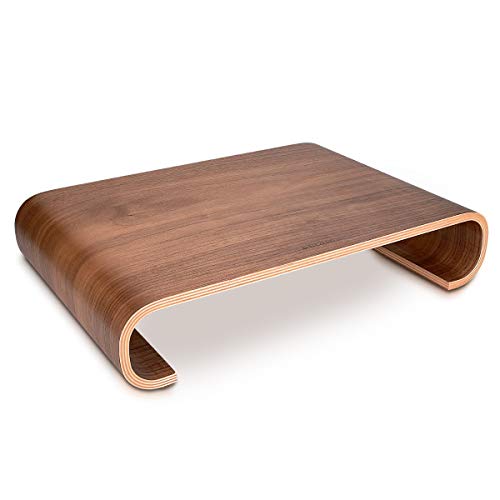 Navaris Wood Monitor Stand Riser Real wood with cork underneath at 2.8 inches, for a desk that needs a small correction rather than a big one. | A low lift on a shallow desk | $76.99 - View on Amazon #ad Price as of October 21, 2026. How this is funded |
1. A fixed-height riser that looks like furniture
VIVO 24-Inch Wood and Steel Monitor Riser
A 24-inch wood top on steel feet, rated to 44 lb, at one fixed height of 4.6 inches. No adjustment, and that is the point.
#ad Price as of October 21, 2026. How this is funded
4.6 inches is the tallest fixed riser in this comparison, and height is the whole reason to buy one. A monitor sitting on a desk usually puts the top of the screen well below eye level, which is what pulls a neck forward over a working day.
At almost 24 inches wide it is a shelf rather than a plinth. A keyboard slides underneath when the desk is cleared, which is the practical upside of the width; the catch is that it needs that width free either side of the monitor.
Ten and a quarter inches of depth is the number to check against the desk pad underneath. On a 15.7-inch-deep pad it leaves about five and a half inches in front, which is enough for a keyboard and nothing else.
| Dimensions | 23.8" wide x 10.3" deep x 4.6" tallSource: Newegg - VIVO 24" Wood Desktop Stand |
|---|---|
| Load rating | Up to 44 lbComfortably more than any single monitor.Source: Newegg - VIVO 24" Wood Desktop Stand |
| Construction | Wood top on steel feetSource: Amazon listing - VIVO 24 inch Monitor Stand, Wood and Steel Desktop Riser |
| Height adjustment | Not publishedThere is none. This is a single fixed height, which is a design decision rather than an omission - see the reading below. |
What it does well
- The tallest fixed height here, which is the one thing a riser is bought for.
- 44 lb rating, far beyond a single monitor.
- Wood top on steel feet reads as furniture rather than office equipment.
What it does not
- No height adjustment at all. If 4.6 inches is wrong for your seating, it is wrong permanently.
- Deeper than the Navaris, so it eats more of a shallow desk.
- Nearly 24 inches wide, which crowds a narrow desk.
Skip this: if you do not already know your correct screen height. A fixed riser commits you; a stackable one lets you find the height first. See what actually helps on a desk.
2. Finding the right height before committing
Amazon Basics Height Adjustable Monitor Stand Riser
Three stackable heights in ABS plastic. It is the least handsome option here and the only one that lets you experiment.
#ad Price as of October 21, 2026. How this is funded
The adjustment range spans almost exactly what the two wood risers offer as fixed heights - 2.87 inches at the bottom, 4.8 at the top. Buying this first and finding out which tier feels right is a genuinely sensible way to shop for a fixed one later.
22 lb is the lowest rating in this comparison and it is still more than most single monitors weigh. Check yours if it is a large or older panel; that is the one case where the number bites.
ABS plastic is the honest weakness. It works, it is light, and it will never look like the wood options on a desk you care about the appearance of.
| Heights | 3 levels: 2.87", 4.2" and 4.8"Stackable, so the height is set by how many tiers you use.Source: Amazon listing - Amazon Basics Height Adjustable Monitor Stand Riser |
|---|---|
| Load rating | Up to 22 lbSource: Amazon listing - Amazon Basics Height Adjustable Monitor Stand Riser |
| Material | ABS plasticSource: Amazon listing - Amazon Basics Height Adjustable Monitor Stand Riser |
| Storage | Includes a storage organizerSource: Amazon listing - Amazon Basics Height Adjustable Monitor Stand Riser |
What it does well
- Three heights spanning the range both fixed risers occupy, so you can find yours.
- Cheapest way to test whether a riser helps at all before spending on a wooden one.
- Stackable tiers pack down if you move desks.
What it does not
- ABS plastic looks like office equipment, not furniture.
- 22 lb rating is the lowest here - worth checking against a large monitor.
- Stacked tiers are less rigid than a single solid shelf.
Skip this: if the desk is somewhere you care how things look. It is the practical choice and the plainest one, and on a desk chosen for its appearance that trade goes the other way.
3. A low lift on a shallow desk
Navaris Wood Monitor Stand Riser
Real wood with cork underneath at 2.8 inches, for a desk that needs a small correction rather than a big one.
#ad Price as of October 21, 2026. How this is funded
2.8 inches is half the lift of the tallest riser here, and for a lot of desks that is correct rather than inadequate. If the monitor already has a stand with some height in it, adding 4-plus inches overshoots and you end up looking up, which is its own problem.
Cork underneath is the specification worth noticing. A hard-footed riser sitting on a PU desk pad presses four marks into it permanently; cork spreads the load and does not.
The absent load rating is the honest gap. Solid wood at this size will not sag, but we are inferring that from the material rather than reading it off a spec sheet.
| Dimensions | 13.7" x 9.4" x 2.8"Source: Amazon listing - Navaris Wood Monitor Stand Riser |
|---|---|
| Material | Real wood, with cork padding underneathCork is the detail that keeps it from marking a desk or a pad.Source: Amazon listing - Navaris Wood Monitor Stand Riser |
| Load rating | Not publishedNot stated on the listing. Solid wood at this footprint is not a flex risk, but the figure is genuinely absent. |
What it does well
- A modest 2.8-inch lift, which is the right correction for a monitor that already sits on a stand.
- Cork base will not mark a desk or a desk pad.
- Real wood rather than a wood-look laminate.
What it does not
- No published load rating.
- May be too low if the monitor sits flat on the desk with no stand of its own.
- No adjustment.
Skip this: if the monitor currently sits flat on the desk. From that starting point 2.8 inches usually is not enough, and you want the taller fixed riser or the stackable one.
Work out the height before you look at anything
The widely used guidance is that the top of the screen should sit at or slightly below eye level when you are sitting upright. Most monitors on most desks sit below that, which is why the neck tips forward.
Measure it in two minutes
- 1
Sit the way you actually sit
Not the corrected posture you adopt when measuring. Feet down, back against the chair, looking straight ahead at the wall behind the monitor.
- 2
Mark where your eyeline hits
Have somebody mark the point on the monitor bezel, or note it against something behind the screen. That is your eye level.
- 3
Measure from there to the top of the screen
If the top of the screen is below your eyeline, the gap is roughly the lift you need. If it is already at or above, you do not need a riser at all - and buying one will make things worse.
- 4
Subtract any lift you are adding some other way
A monitor arm, an existing stand or a stack of books already contributes. Only the shortfall needs solving.
| Riser | Height | Load rating | Depth |
|---|---|---|---|
| VIVO wood and steel | 4.6" | 44 lb | 10.3" |
| Amazon Basics adjustable | 2.87", 4.2" or 4.8" | 22 lb | Stackable tiers |
| Navaris wood | 2.8" | Not published | 9.4" |
Those three cover the useful range between them. Under three inches is a small correction for a monitor that already sits on a stand; four to five inches is what a screen sitting flat on a desk usually needs.
Depth is the measurement that bites
Height gets all the attention and depth is what causes returns. A riser roughly nine inches deep sits on the desk behind the keyboard, and it has to fit between the back of the working area and whatever is behind it.
It also eats desk pad. On a 15.7-inch-deep pad, a 10.3-inch riser leaves about five and a half inches in front of it - enough for a keyboard and nothing else, so a notebook in front of the keyboard stops fitting. Check both numbers together rather than separately, and the desk pad sizing guide has the pad side of the arithmetic.
Buy adjustable first if you do not know your number
This is the practical recommendation and it is why the plastic stackable one sits second rather than last. Its three heights span almost exactly the range the two wood risers occupy as fixed heights, so you can find out which one is right while spending the least.
A fixed riser at the wrong height is not a small error. Too low does nothing and too high tips the head back, which is its own strain. If you already know your number from a previous setup, buy the fixed wooden one and enjoy the fact that it looks like furniture.
The load rating, and when it actually matters
Most single monitors weigh far less than any of these ratings, so for most buyers this row is noise. It stops being noise in two cases: a large panel above about 30 inches, and an older monitor with a heavy base.
The Navaris publishes no rating at all, which is worth flagging honestly. Solid wood at that footprint is not a sag risk and we are inferring that from the material rather than reading it off a spec sheet - which is exactly the sort of gap this site marks rather than papers over.
What we would not buy
- A riser, if the screen is already at eye level. Raising it further tips the head back and trades one problem for another.
- A riser with a drawer, on a shallow desk. The drawer adds depth you may not have, for storage a desk organizer does better - see desk organizers.
- A glass riser. It shows every mark, and a hard foot on a desk pad presses permanent dents into it.
- A monitor arm, if you only want height. An arm is the better answer when you need to move the screen repeatedly, and considerable overkill when you want it four inches up and then never touched again.
Questions people actually ask
How high should a monitor riser be?
Enough to put the top of the screen at or slightly below eye level when you sit normally. Measure the gap between your eyeline and the top of the screen - that gap is roughly the lift you need.
Do I need a monitor riser?
Only if the top of your screen currently sits below your eyeline. If it is already at or above it, a riser makes things worse by tipping your head back.
What depth monitor riser fits my desk?
Check it against the desk pad as well as the desk. A 10.3" riser on a 15.7"-deep pad leaves about five and a half inches in front - enough for a keyboard and nothing else.
Should I get an adjustable or fixed monitor stand?
Adjustable first if you do not already know your height. A stackable riser spans the range the fixed ones occupy, so you can find your number cheaply and buy a wooden one later.
Does the load rating matter?
Rarely - most single monitors weigh well under these ratings. It matters for large panels above about 30 inches and for older screens with heavy bases.